
Growing companies struggle to grow when marketing, sales, and service departments are buried in manual tasks, working across disconnected systems, and dealing with inconsistent data. Business automation tools help companies reduce that friction by connecting key systems, automating predictable workflows, and giving sales reps and marketers more time to focus on customers rather than admin work.

This guide breaks down the main types of business process automation software, how automation supports each stage of growth, and what to look for when choosing a business automation platform. It also includes a rollout blueprint for implementing automation without creating chaos.
Table of Contents
- What are business automation tools?
- How Automation Categories Support Each Stage of Growth
- Business Automation Tools for Acquisition
- Business Automation Tools for Conversion
- Business Automation Tools for Retention and Expansion
- How to Choose Business Automation Software that Fits Your Stack
- How to Implement Business Automation Without Creating Chaos
- Frequently Asked Questions About Business Automation Tools
What are business automation tools?
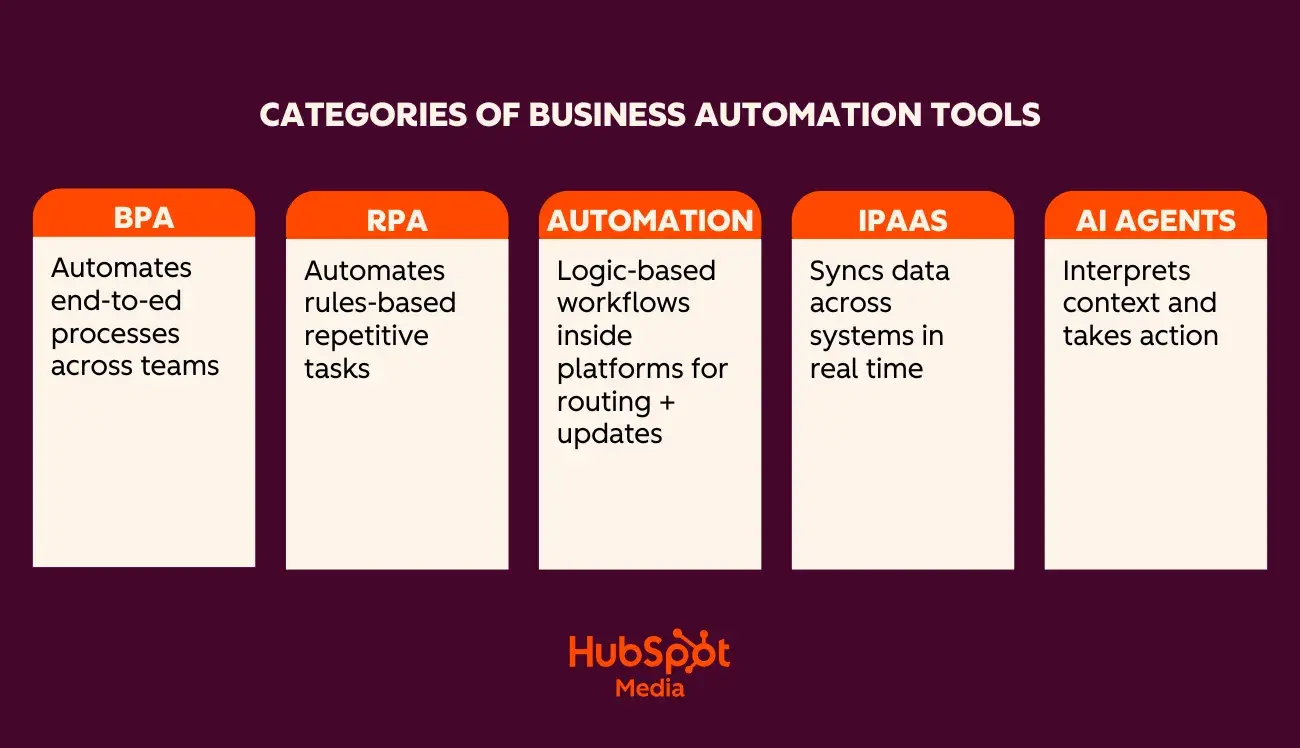
Business automation tools — sometimes called business automation software — handle repetitive work, keep data consistent, and help marketing, sales, and service departments move faster with fewer errors. They typically fall into five categories:
- Business process automation (BPA). Automates multi-step processes across departments (approvals, onboarding, lead management). BPA improves how a process works end-to-end and often overlaps with business process management when companies are standardizing operations.
- Robotic process automation (RPA). Uses bots to complete simple, structured tasks such as copying data from one system to another. It’s useful for legacy systems that don’t integrate well, but it’s limited to task-level work.
- Workflow automation. Logic-based workflows inside platforms like CRMs. These handle lead routing, notifications, field updates, and task creation. Workflow automation is the backbone of most modern business process automation software.
- iPaaS (integration platform as a service). Connects tools so data stays synced in real time.
- AI agents. Tools that interpret context and take action on it. HubSpot’s Breeze, for example, automates prospect research, outreach, and follow-up based on CRM insights.
Together, these categories form a modern business automation platform that supports the entire customer lifecycle. If you’re still mapping the processes behind those workflows, it can help to step back and look at broader business process management before layering on automation.
Why Business Automation Matters
Marketing, sales, and service departments rarely struggle because they’re not working hard enough — they struggle because their systems don’t talk to each other. When data is inconsistent and handoffs break down, it shows up as delays, rework, and customer friction. Automation closes those gaps by connecting tools and making sure critical steps happen the same way every time.
Automation supports growth in three core areas:
- Acquisition. Faster lead capture, cleaner data, and clearer visibility into intent.
- Conversion. More consistent follow‑up, healthier pipelines, and fewer stalled deals.
- Retention and expansion. Smoother onboarding, proactive support, and timely renewals.
That’s why a common pattern in HubSpot implementations is that the earliest wins come from tightening the handoffs between marketing, sales, and customer success. Even simple workflow automation reduces delays by replacing Slack messages and spreadsheets with automated handoffs.
For a deeper look at how automation is evolving, this overview of the future of automation outlines how AI, workflows, and unified data are shaping modern operations.
How Automation Categories Support Each Stage of Growth
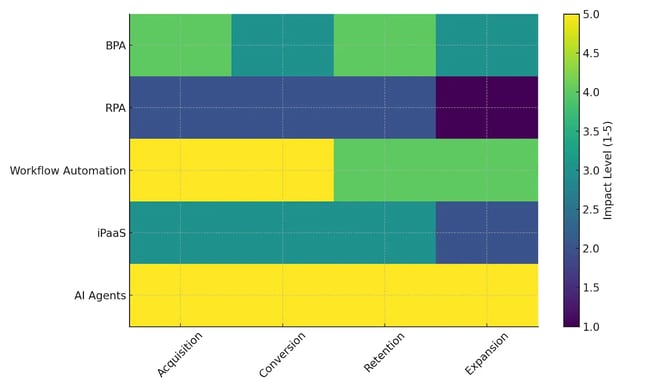
Different automation types play different roles across the customer journey. Some tools help to capture cleaner leads, others support healthier pipelines, and others improve onboarding and long-term retention. The table below shows how the major automation categories — BPA, RPA, workflow automation, iPaaS, and AI agents — typically map to acquisition, conversion, retention, and expansion.
Impact Comparison Table
(1 = lowest impact, 5 = highest impact)
Automation Category | Acquisition | Conversion | Retention | Expansion |
BPA | 4 | 3 | 4 | 3 |
RPA | 2 | 2 | 2 | 1 |
Workflow Automation | 5 | 5 | 4 | 4 |
iPaaS | 3 | 3 | 3 | 2 |
AI Agents | 5 | 5 | 5 | 5 |
AI agents and workflow automation tend to have the broadest influence across the customer lifecycle because they support multi-step processes and automate actions in real time. RPA is more task-specific, while BPA and iPaaS sit in the middle — strengthening processes when paired with a unified CRM.
The heatmap below highlights how each category typically contributes at different growth stages.
Business Automation Tools for Acquisition
At the acquisition stage, business automation tools help marketing departments capture leads, enrich records, and route qualified prospects to sales quickly. When those steps aren’t automated, top-of-funnel work gets messy fast — especially when leads come in from multiple channels.
Here are a few tools that help marketing departments automate the core acquisition workflows — from capture to enrichment to routing.
1. HubSpot Breeze
Breeze researches prospects, drafts personalized outreach, and logs insights directly into a CRM. It’s especially helpful when trying to increase coverage without assigning reps more work.
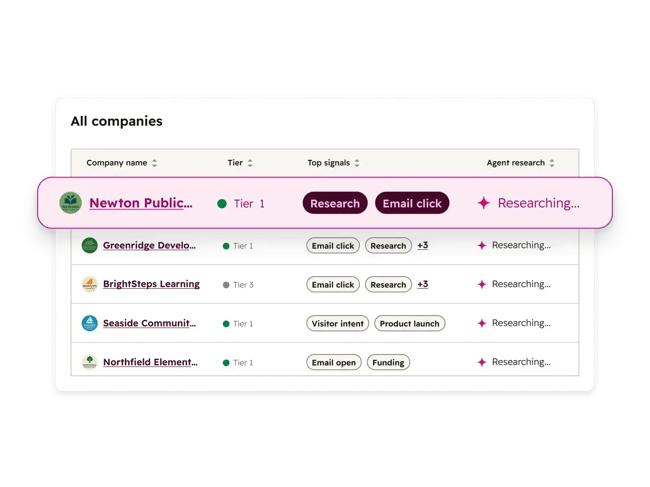
What I like: Breeze spots patterns across accounts — not just individual contacts — so reps aren’t starting from a blank page every time they open their queue.
Best for: Sales organizations that want more qualified conversations without immediately growing headcount.
Pro tip: Pair Breeze with a lead-scoring workflow so high-fit accounts get surfaced first and handed off to sales faster.
Real-world impact: SylvanSport, a recreational vehicle company, reduced touchpoints from 76 to 13 per deal after implementing Breeze Prospecting Agent. Sandler, a global sales training company, achieved even broader results: a 60% increase in SQLs converting to pipeline, 4x more sales-qualified leads, and a sales cycle cut in half — from 90 days to 45 days.
2. HubSpot Marketing Hub + Smart CRM
HubSpot’s Marketing Hub brings all top-of-funnel activity — forms, ads, chat, and email — directly into HubSpot’s Smart CRM. Smart CRM becomes the single source of truth, while Marketing Hub workflows handle enrichment, lead scoring, and routing so reps get notified the moment someone shows intent.
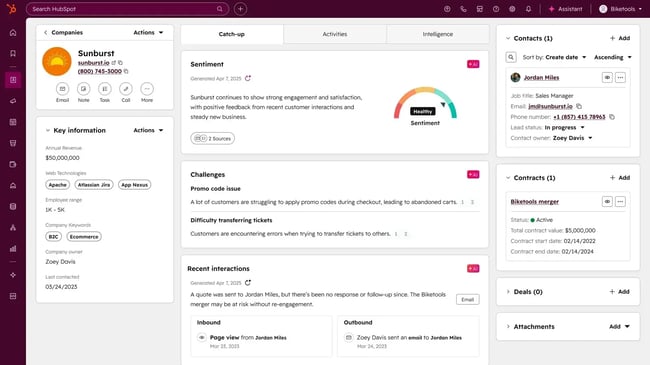
What I like: Marketing Hub combines form fills, email engagement, and website activity into a single score, then routes leads automatically based on territory, segment, or product interest.
Best for: Marketing departments juggling multiple channels who want one place to manage top-of-funnel automation.
Pro tip: Use integration automation to pull key signals from other tools into HubSpot, so scoring models reflect the full customer journey.
Companies adopting HubSpot’s Smart CRM often see faster results at the acquisition stage because enrichment, scoring, and routing all run on the same dataset. When those pieces live in one place, lead handoff issues tend to drop significantly because reps finally have shared context.
3. Leadfeeder
Leadfeeder identifies which companies visit a website — even anonymous visitors who don’t fill out forms — and reveals which pages they viewed, how long they stayed, and how frequently they return. It enriches these visitors with firmographic data such as company size, industry, and contact information, then automatically syncs everything to the CRM platform.

What I like: Most website visitors never fill out forms. Leadfeeder captures buying intent from anonymous traffic, giving sales and marketing visibility into accounts researching solutions before they’re ready to engage.
Best for: Demand generation teams running account-based marketing programs or sales teams that want to identify and prioritize accounts showing research intent.
Pro tip: Set up Leadfeeder to automatically add high-intent visitors to HubSpot lists based on page views (pricing pages, case studies, product comparisons, etc.), then trigger automated email sequences or sales alerts when key accounts hit specific thresholds.
Business Automation Tools for Conversion
During conversion, business automation tools help sales departments maintain pipeline hygiene, automate follow-up, improve forecasting accuracy, and keep deals moving with fewer manual touches. These workflows prevent stagnation and give reps clearer visibility into which opportunities need attention.
Here are some popular tools used to automate conversion workflows.
4. HubSpot Sales Hub
HubSpot’s Sales Hub brings forecasting, pipeline management, sequences, and deal automation into one place. Reps can automate follow-up, keep deals updated, and use AI forecasting to understand where revenue is tracking without pulling manual reports. HubSpot’s lead management and prospecting software surfaces and prioritizes your most impactful prospecting actions, automates research and outreach with the prospecting agent, and turns insights into relevant conversations that drive results.
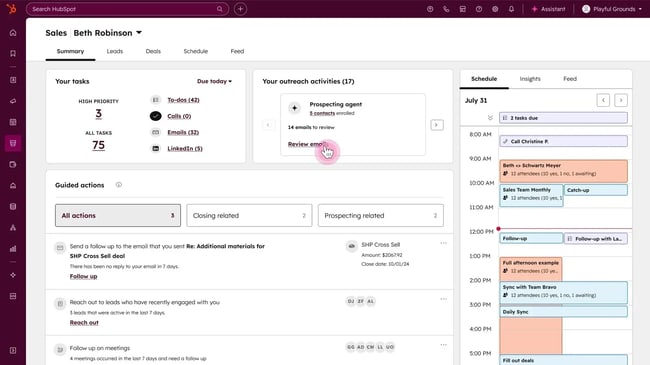
What I like: Pipeline rules prevent deals from sitting in the wrong stage for weeks, giving leaders a more accurate view of performance.
Best for: Sales organizations that struggle with inconsistent follow-up or unclear forecasting.
Pro tip: Use sales automation to trigger reminders or tasks whenever a deal goes quiet. HubSpot has sales automation tools built into Sales Hub.
Real-world impact: Agicap, a FinTech company serving mid-market clients, achieved a 20% increase in deal velocity and 100% CRM adoption across 150+ sales reps in six countries. By automating call summaries and follow-ups with Breeze, they’re saving 750 hours weekly — time that now goes toward customer engagement rather than administrative work.
5. Gong
Gong analyzes sales calls, emails, and CRM activity to surface pipeline risks and opportunities. Using AI to analyze conversation patterns, Gong identifies when deals are stalling, which objections are recurring, and where reps might be missing buying signals. It flags deals that need attention and surfaces the specific moments in calls that indicate risk or opportunity.
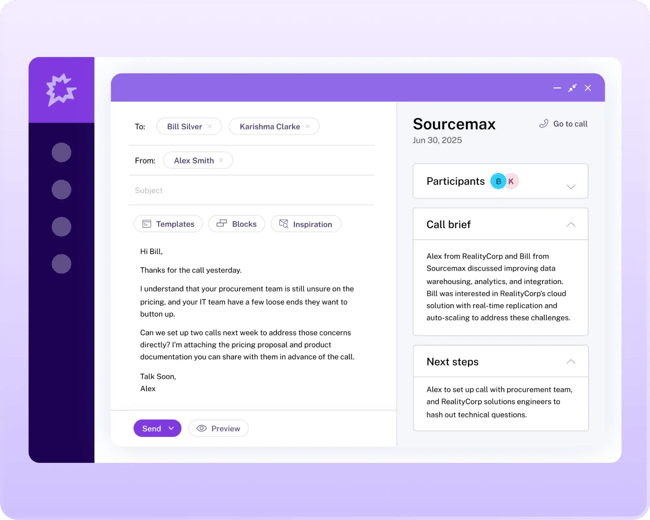
What I like: Gong turns qualitative conversations into quantitative deal intelligence. Instead of relying on rep intuition about deal health, managers get objective data on talk-to-listen ratios, competitor mentions, pricing discussions, and next-step commitments — making it easier to coach effectively and forecast accurately.
Best for: Sales leaders and revenue operations teams that want visibility into what’s actually happening in sales conversations, not just CRM updates.
Pro tip: Sync Gong deal warnings into HubSpot and create workflows that automatically notify owners, trigger tasks, or update deal stages based on specific risk signals, such as no next steps scheduled or pricing concerns raised.
6. Chili Piper
Chili Piper automates inbound meeting routing and scheduling based on territory, product interest, deal size, or custom rules. When a qualified lead requests a demo, Chili Piper matches them with the right rep, checks calendar availability, and books the meeting instantly — eliminating the days-long back-and-forth that causes leads to go cold.
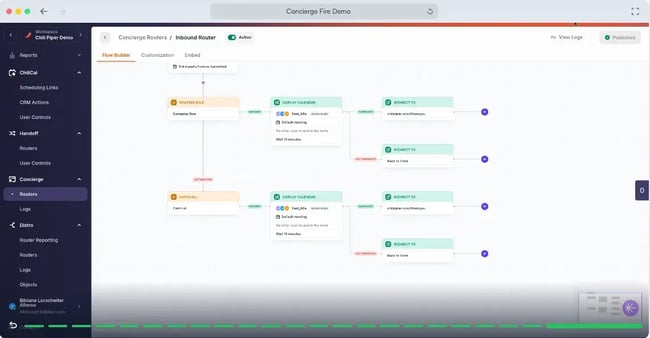
What I like: Chili Piper removes friction at a critical moment. Instead of sending a “let’s find time” email that sits in an inbox, prospects book directly from the company’s website or email while still engaged. The instant gratification increases show rates and keeps deals moving.
Best for: Sales departments handling high volumes of inbound demo requests or companies with complex routing rules across multiple territories or products.
Pro tip: Tie Chili Piper meetings to deal creation in HubSpot so every booked meeting automatically moves the deal forward. Sync no-show data back to HubSpot to trigger automated follow-up sequences.
Business Automation Tools for Retention and Expansion
Once a customer signs, automation helps to deliver a smoother experience — from onboarding to proactive success outreach to renewal management. The right tools reduce manual check-ins, surface risks or opportunities earlier, and keep account data aligned across departments.
Here are a few tools that support retention and expansion.
7. HubSpot Service Hub
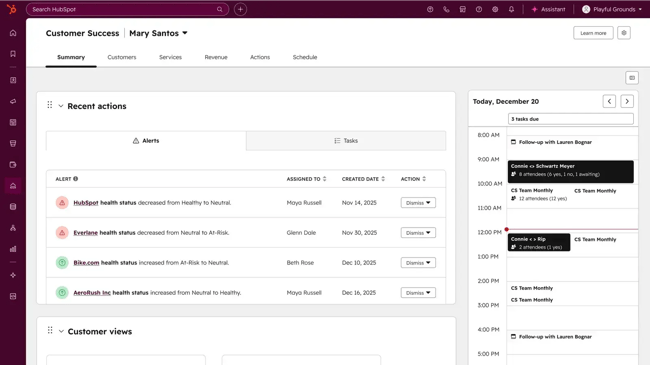
Service Hub centralizes customer communication and automates repetitive tasks that slow down support teams. The platform assigns onboarding tasks, routes tickets to the right owners, and sends renewal reminders without relying on manual follow-up. Because everything feeds into Smart CRM, customer support, sales, and marketing get a full view of each account — from support history to product usage — which makes cross-sell and upsell opportunities easier to identify.
Customer automation at scale: YuLife, an insurtech company serving 1,200+ organizations, achieved a 98% customer retention rate — 20% above the industry average — by automating renewal workflows and customer nurturing in Service Hub and Data Hub. Their automated workflows power the entire customer journey from onboarding through renewal, saving thousands of hours monthly while enabling net revenue retention as customers expand their usage.
What I like: Onboarding tasks, ticket activity, and renewal workflows all live on the same record, so CSMs don’t have to dig through multiple systems to understand an account’s status.
Best for: Customer success departments that want onboarding, support, and renewal ops connected to the same customer profile.
Pro tip: Use CRM–accounting integration to sync renewal dates and ensure billing, customer success, and sales teams stay aligned on renewal timing.
8. ChurnZero
ChurnZero monitors product usage, feature adoption, and engagement to calculate health scores and predict churn risk. Automated playbooks guide customers through onboarding milestones, while usage-based triggers send in-app messages, emails, or create tasks when behavior signals risk or opportunity — like declining logins or increased seat usage.
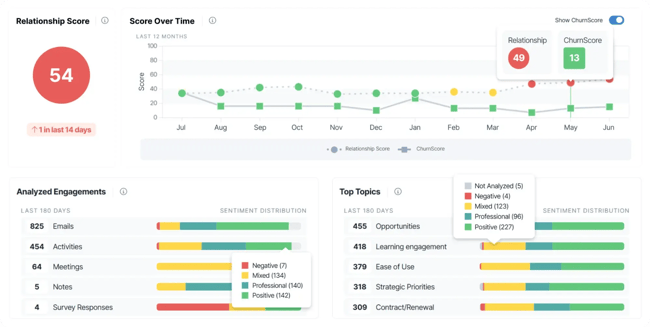
What I like: Health scores and alerts are easy to customize and integrate cleanly with HubSpot workflows.
Best for: SaaS companies that rely on usage insights to drive proactive engagement.
Pro tip: Connect ChurnZero health scores and segments to HubSpot lists so marketing can target at-risk accounts, and sales receive alerts when accounts show expansion signals.
9. Intercom Fin
Intercom’s Fin AI Agent automates in-app onboarding messages, handles common support questions, and escalates more complex issues to human agents when needed. Because it runs across channels like chat, email, and social, customers get consistent answers without waiting in a queue.
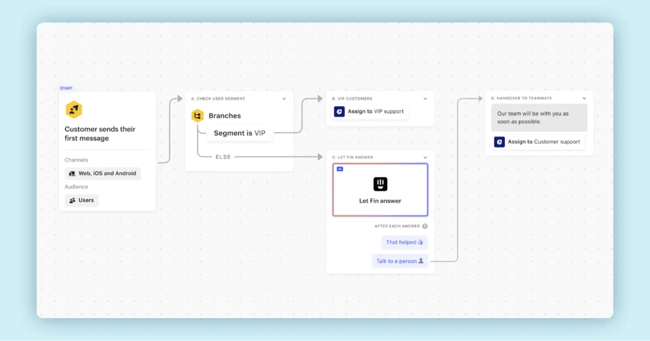
What I like: Fin turns everyday support interactions into signals — things like increased usage, new seat invitations, or repeat questions about advanced features — that can hint at expansion opportunities before renewal.
Best for: Product-led teams or businesses with high daily active user counts looking to tie support and expansion closer together.
Pro tip: Connect Fin’s conversation data to CRM systems so customer success managers can see recent AI-handled interactions alongside tickets and usage trends when planning renewal or upsell outreach.
How to Choose Business Automation Software that Fits Your Stack
Choosing the right business automation platform comes down to fit — not just features. The best tools work with existing systems, support how departments already operate, and scale as processes evolve.
Here are a few things to look for when evaluating vendors:
- Native CRM integration without custom development or fragile workarounds.
- Flexible workflow logic, not just simple if/then automations.
- Cross-functional data consistency across marketing, sales, service, and finance.
- Transparent logging and reporting to track workflow behavior.
- Operational fit with daily workflows, especially where delays or manual clean-up happen today.
- Scalability that adapts to process changes instead of forcing constant redesigns or custom scripts.
These criteria help buyers filter out tools that look powerful on paper but introduce operational debt later.
HubSpot’s ecosystem of CRM, sales, marketing, service, and data software all integrate natively and can scale with your team.
Build vs. Buy: How to Make the Right Call
Many companies eventually face the question: Should we build this workflow in-house or adopt a platform that already supports it?
Here’s a simple way to evaluate the tradeoffs:
Question | Build In-House | Buy a Platform |
Resources Available | Requires dedicated engineers and ongoing maintenance. | Minimal setup; vendor manages updates and infrastructure. |
Customization Needs | Fully customizable but time-intensive. | Pre-built automation templates and integrations speed up rollout. |
Total Cost Over Time | Lower up-front cost, higher long-term upkeep. | Subscription cost with a lower total cost of ownership. |
Security and Compliance | Must be managed internally. | Vendor provides enterprise-grade compliance and data security. |
Scalability | Can strain internal resources as workflows expand. | Scales automatically with business growth. |
When evaluating options, factor in both speed to value and the long-term maintenance burden. Many growing companies find that adopting a unified automation platform — rather than stitching together point solutions — leads to faster ROI and fewer operational surprises.
Customer success departments using HubSpot’s Service Hub tend to adopt onboarding workflows first because these workflows eliminate many of the early-stage gaps that lead to churn. Even simple automations like task queues or usage alerts create an immediate lift in customer responsiveness.
How to Implement Business Automation Without Creating Chaos
Successful automation starts small. Companies get into trouble when they try to automate every workflow at once or skip the foundational work of mapping how things should operate. A phased rollout provides cleaner data, fewer exceptions, and a far more reliable system.
Below is a simple blueprint that works for any department — marketing, sales, service, or operations.
Step 1: Pick one journey to start with.
Choose a workflow that’s high-impact but contained. That might be lead routing, onboarding, or renewal reminders. Focusing on a single journey helps surface issues quickly and gives stakeholders a clear before-and-after comparison.
Step 2: Map the current and target state.
Before building anything, outline how the process works today and how it should work. Identify where handoffs break, where data is missing, and where departments rely on manual steps. The target-state map becomes the source of truth when designing workflows.
Step 3: Define SLAs and responsibilities.
Automations only work when departments agree on response times, field requirements, and what “done” looks like at each stage. Set service-level agreements (SLAs) for updates, follow-up, and handoffs, so workflows reinforce good habits instead of creating ambiguity. This governance structure keeps automation aligned with business objectives and reduces confusion as more departments get involved.
Step 4: Set guardrails before launch.
Decide which fields must be completed before automation can run, which users can update certain properties, and what should happen when data is missing. Guardrails prevent workflows from firing incorrectly and keep CRMs clean as they scale. Platforms like HubSpot let admins define guardrails at the workspace level, ensuring data remains consistent across marketing, sales, and service.
Step 5: Build and QA the workflow.
Test every automation end-to-end. Confirm that triggers fire correctly, notifications reach the right people, and data flows accurately between systems. After launch, track early performance metrics and user feedback to refine and optimize the setup. A short quality assessment loop upfront prevents most issues that arise later.
Pro tip: Use HubSpot’s sandbox environment to safely test complex workflows before rolling them out across live CRM data.
Step 6: Roll out in stages.
Roll it out to a small group first — usually a handful of people who will use the workflow most. Collect feedback, adjust the workflow, and expand rollout once everything behaves as expected.
Step 7: Revisit and refine regularly.
Processes evolve, and automation should grow with them. Review workflow logic every quarter to ensure it still aligns with how departments operate. This keeps automations accurate and prevents technical debt from building up.
Frequently Asked Questions About Business Automation Tools
What is the difference between BPA and RPA?
Business process automation (BPA) focuses on improving multi-step workflows across teams — things like lead routing, onboarding, renewals, or ticket escalation. It works at the “process” level inside a CRM or automation platform.
Robotic process automation (RPA) is different. It uses bots to complete repetitive, rules-based tasks that normally require someone to click through screens or copy data between systems. BPA improves how a process works; RPA mimics the clicks.
How do I avoid automating broken processes?
Start by mapping the current process before automating anything. Identify missing data, inconsistent steps, and unclear ownership. If a handoff is already unreliable, automation won’t fix it — it will just move the mistake faster. Clean up fields, roles, and SLAs first, then automate the process.
Which teams should own automation and governance?
Most companies get the best results when ownership is shared. RevOps or Operations typically maintains the workflows, manages guardrails, and ensures data stays accurate. But each business unit — marketing, sales, service, and success — should own the logic of the processes they rely on. Governance works best when Ops controls the system, and individual departments control the “why” behind their workflows.
How long does it take to see value from automation?
Simple workflows like routing, notifications, or field updates show value immediately. More complex automations — onboarding sequences, renewal triggers, cross-sell workflows — can take a few weeks as the organization refines the process and the data settles. The biggest gains usually come after the first quarter, once reporting trends become clear and workflows eliminate the need for manual cleanup.
What if my stack is already full of disconnected tools?
When a tech stack includes siloed systems, look for a unified automation platform that integrates natively across marketing, sales, and service. Consolidating tools around a shared data model, like HubSpot’s Smart CRM, eliminates duplicate workflows and ensures every automation runs from the same source of truth.
Start automating your business processes.
Business automation tools work best when they connect data, reduce manual cleanup, and support the way departments already operate. The real value isn’t in replacing people — it’s in giving marketing, sales, service, and operations the clarity and consistency they need to grow without adding extra overhead.
For companies that want one place to run acquisition workflows, manage pipeline automation, support customers, and tie everything back to a unified record, HubSpot’s Smart CRM and connected Hubs offer a single platform to build on. And with Breeze, HubSpot’s AI agent for prospecting, sales reps can automate more of the repetitive work that keeps them from focusing on the conversations that move deals forward.
I’ve seen firsthand how much smoother things get when automations support the process instead of taking it over. Start with one workflow, build it well, and expand as data and departments mature. With the right foundation, automation becomes one of the most reliable ways to drive growth across the entire customer journey.
Business automation works best when everything runs on the same foundation — data, workflows, and AI working together instead of in separate tools. Companies ready to automate acquisition, conversion, and retention in one place can explore HubSpot’s Smart CRM and connected Hubs to see what that looks like in practice. Start free or get a demo to map the first workflow with an expert.
